BBPOS WisePad 3
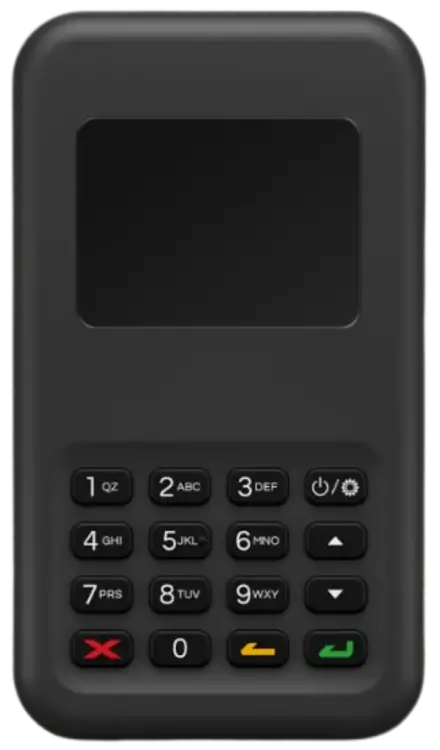
Take payment at a table, market stall, or client’s door. Enter the amount in ChargeStripe, then hand over the reader. Customers can tap or insert their card and enter a PIN on the built-in keypad when prompted.
On a $100 payment, ChargeStripe charges $1.30. Stripe processing fees are additional. See ChargeStripe pricing
Buying a reader for a US business? See the Stripe Reader M2.
When to choose the WisePad 3
Take the reader to the customer
The handheld reader connects to your phone over Bluetooth, so you can take payment where you finish the sale.
Accept cards that need to be inserted
If a customer’s card requires a chip transaction, they can insert it in the reader.
Give customers a physical PIN pad
Customers enter their PIN on the reader’s keypad while you keep your phone in hand.
Compare card readers
Four Stripe card readers and where each one fits.
What you need
Phone A compatible phone with Bluetooth enabled. Keep the reader near your phone during payment.
App The ChargeStripe app
App Store · Google Play
Stripe account A Stripe account in a supported country.
Country availability
Where Stripe offers the WisePad 3. Not available in the United States.
Stripe’s list can change, so check Stripe’s WisePad 3 page before you order.
Technical specifications
Payments Chip cards, contactless cards and digital wallets. No magstripe
PIN entry Built-in secure PIN pad
Display 2.4" colour LCD (320 x 240), backlit
Connection Bluetooth to your phone
Battery About 15 hours of active use, 20 hours on standby, 2 hours to charge
Charging USB-C cable or accessory dock
Size 69.7 x 121.7 x 17.7 mm (2.74 x 4.79 x 0.7 in)
Weight 130 g (4.59 oz)
Security End-to-end encryption, P2PE ready, PCI PTS listed
Specifications from Stripe. Battery life is an estimate and depends on use.
Connect your WisePad 3
- Prepare the reader Charge the WisePad 3 and add your business location in Stripe.
- Connect it to ChargeStripe Turn on Bluetooth, open Connect Card Reader in the app, and select your reader and location.
- Take a payment Enter the amount, select Card Reader, and tap Charge. Hand the reader to your customer.

Questions before you order
How much does the WisePad 3 cost?
Stripe sets hardware prices by country. Sign in to your Stripe Dashboard to see the price for your business.
Can customers swipe a card?
The WisePad 3 accepts inserted chip cards, contactless cards, and supported digital wallets. It does not accept magnetic-stripe swipes.
Do I need a reader if I already use Tap to Pay?
If your customers need to insert a card or use a physical PIN pad, the WisePad 3 gives them those options. If they usually tap, compare it with Tap to Pay on your phone.
Accept Payments
on your phone Today

