How to Collect Tips & Gratuity for Your Small Business, Anywhere on ChargeStripe
Today using ChargeStripe
Transitioning to digital tipping isn’t a nice-to-have; it’s a necessity, as your customers expect convenient ways to tip.
The great news is that it's incredibly easy to do this using your existing Stripe account and a powerful mobile tool like ChargeStripe. You can begin accepting payments anywhere.
In this guide, we’re going to walk you through exactly how to set up Stripe tips functionality, how to easily collect tips, and ultimately help your staff earn more.
Table of Contents
- Can I Accept Tips on Stripe?
- The Importance of Providing the Option for Tips
- How to Easily Accept Tips, Anywhere
- Setting Up Staff for Success to Collect Tips
- Real-Life Scenarios of Collecting Tips
- Commonly Asked Questions
Can I Accept Tips on Stripe?
In short, yes, you can easily accept tips if you have a Stripe account.
The main Stripe dashboard is primarily designed for desktop use and invoicing, so to collect tips digitally, you’ll need software that acts like a point-of-sale (POS) system.
This is where ChargeStripe comes in.
It easily connects to your Stripe account and turns your iPhone or Android phone into a mobile card reader. You can then simply present a tipping screen to your customers during checkout. It processes the tip along with the main payment and deposits the funds directly into your Stripe account.
The Importance of Providing the Option for Tips
Now that you know how easy it is to accept tips anywhere, it’s essential that you begin implementing this immediately, as the benefits for your business are immense.
Better Customer & Staff Experience
Your customers want to support your staff, so when you eliminate the ‘cash requirement’ barrier, you allow the customer to provide that tip to your hard-working employees. Everyone wins.
Happier Staff
When you empower staff to accept tips anywhere, the positive impact on work morale is massive. This is because when employees see that their extra effort translates directly into financial reward, engagement soars.
Not only does the flexibility of digital tipping increase morale, but digital tips also tend to be higher because the app can suggest percentages (like 15%, 20%, or 25%) based on the total bill. For example, if you’re a hair stylist, this can mean a significant increase in take-home pay on a $500 hair appointment.
Easy and Secure
Handling cash tips can be problematic because cash is easily lost or stolen. Luckily, when you accept tips from a card reader or a smartphone, Stripe and ChargeStripe are secure and compliant.
All transactions are encrypted and PCI compliant, leaving you worry-free when it comes to any mismanagement with important tips designated for your employees. Everything is tracked digitally, ensuring every penny ends up where it belongs.
Data and Analytics Benefits
You manage what you measure. The same goes for your business’s tips, and with digital Stripe tips, you get data to help with better decision-making.
You can dive into the data and find out which staff members are earning the highest tips and discover which services generate the best gratuity. With this data, you can easily optimize your operations to reward your top performers and identify training opportunities for other staff who might need the support.
Example
For example, a home cleaning service can gain valuable insights into customer satisfaction by seeing that customers consistently tip when you leave a custom thank-you note on the table before heading out.
Recommended Resource: What is the Cheapest Way to Accept Credit Card Payments?
How to Easily Accept Tips, Anywhere
Equipped with the benefits, it’s time to take action, and it’s easier than you think. You don't need complex coding skills or expensive hardware.
Step 1: Stripe Account Configuration
The easiest step is the first, by basically ensuring that you have an operational Stripe account and that it's not suspended.
Or, if you have multiple accounts, sort out which one you’ll use. You don’t need to enable a specific tipping option.
Step 2: ChargeStripe App Setup
With the Stripe account working, you’ll need to use ChargeStripe to facilitate tips and payments. You can easily do this by downloading the iOS app or the Android app.
Once you have downloaded the app:
- Open ChargeStripe.
- Tap ‘Connect with Stripe.’
- Log in with your Stripe credentials.
- Authorize the connection, and you’re good to go!
Now, your phone is a payment terminal linked to your Stripe account.
Step 3: Creating a Tippable Payment
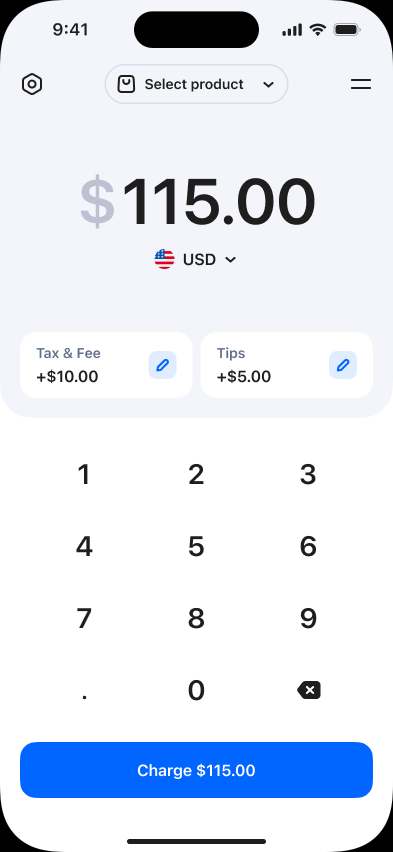
You’re ready to begin accepting tips, and this option is available when you’re processing a payment. The paying client can customize the tip by hitting the right button below the payment amount.
Step 4: Essential Staff Training
To make the experience smooth for your staff and future customers, guide them through the following sub-steps to improve the tipping experience.
Enter the transaction amount
Enter the total transaction amount for the service, including tax and fees. Be sure to double-check the amount.
Turn the screen to the customer
Next, turn the screen toward the customer so they can view the tipping options themselves. Your customers want privacy and don’t want to feel like they’re being pushed to tip. Set the scene for a non-pressuring tipping environment.
Tap "Charge"
Finally, tap the ‘Charge’ button on the terminal or app to proceed with the payment process.
Take Tips Anywhere, No Matter Your Business
Whether you’re running a corner café, managing a food truck, offering hairstyling, or even a resort, you can now accept tips anywhere. With NFC-enabled tipping, card scanning, and manual entry, there’s no need to accept only cash tips.
All you need is your smartphone or tablet, and you’re ready to provide a professional tipping experience, anywhere.
Platform-Specific Guidance
iOS Tap to Pay
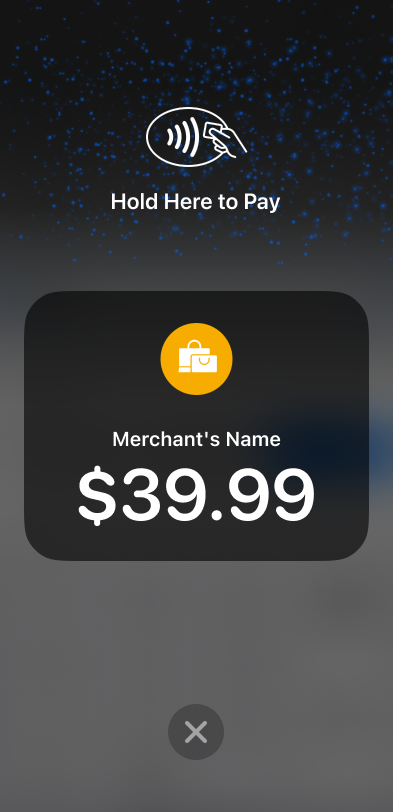
If your team uses an iPhone XS or a newer model, you can easily accept contactless payments directly on the device. The app presents the tipping screen just before the customer taps their card or phone against your iPhone.
Android Tap to Pay
Similar functionality is available on any NFC-enabled Android device, as well. The process is just as simple.
Card Scanning & Manual Entry
What if a customer has a card without a tap feature? Don’t worry. You can use the phone's camera to scan the card details in seconds.
Setting Up Staff for Success to Collect Tips
Empowering your team involves more than just handing them a phone with an app. It involves giving them the confidence to present the payment option professionally.
Additional Training Ideas
Go above and beyond by setting your employees up for success with additional support.
Simple Scripts to Help
Give your employees a one-page document that outlines simple phrases they can consider. For example, instead of saying, ‘Do you want to leave a tip?’, they can say, ‘The screen is just going to ask you a quick question before you insert your card.’ This casual approach feels more natural for everyone.
How to Handle No Tips
Help your employees understand that a ‘no tip’ option is acceptable, and shouldn’t be taken personally. Ideally, they should remain cheerful and thank the customer regardless.
Practice Makes Perfect
If a staff member is still uncomfortable politely asking for a tip, role-play is essential. Run a $1.00 test transaction (you can refund it later) so they can see exactly what the customer sees. Also, give them the space and time to practice their scripts or lines until they sound natural.
Real-Life Scenarios of Collecting Tips
Wondering how this works with specific industries? Here is how different sectors are using ChargeStripe to boost revenue.
Food & Beverage
A food truck at a Sunday market begins offering mobile payments through ChargeStripe. They punch in $15.00 and give the phone to the customer. The customer selects a 20% tip and taps their phone, and pays, completing the transaction in seconds. The line moves faster than ever and the customer doesn’t need to sit there and fumble with their coins in one hand and a burger in the other.
Personal Services (Hair/Beauty)
One day, a client loves their haircut but only has a credit card, and the stylist doesn’t have a traditional card terminal. Using a mobile payment app, the stylist can pull out their phone and let the clients pay right at the chair. The easy payment process leaves the client feeling confident that they provided an excellent tip for the great service. The stylist receives the payment without any inconveniences.
Commonly Asked Questions
Do I Need a Card Reader to Accept Tips?
No, you don’t need a card reader to begin accepting tips anywhere; that’s the great thing about using software like ChargeStripe. With features like Tap to Pay on iPhone and Android, your phone’s built-in NFC chip acts as the reader.
You can also scan cards with the camera or type numbers in manually.
What Percentage Should I Set as Default Tip Options?
Industry standards suggest offering 15%, 20%, and 25%. If your average transaction value is low, like $3 for a coffee, you might switch to dollar amounts ($1, $2, $3). If you are in high-end services, percentages are usually better.
Can Customers Add Tips After The Initial Payment?
Generally, for security and compliance, tips should be added during the authorization process. You could punch in another amount afterwards for a second payment. However, it’s best to collect the tip at the moment of sale.
Do I Need Different Hardware For Accepting Tips?
Nope! As long as you have a compatible smartphone (iOS or Android), you have everything you need. This keeps your overhead costs low—no need to rent expensive terminals from a bank!
Final Thoughts
Collecting tips shouldn't be a headache, and it definitely shouldn't require carrying a pocket full of loose change. By using the already powerful Stripe platform, with the ChargeStripe app, you are modernizing your business and showing your staff that you value their hard work.
Download ChargeStripe for iOS or get ChargeStripe for Android today and start collecting tips with every sale.